Complete Guide: Build a Free Oracle Cloud Server and Connect Antigravity + Hermes Agent to Telegram
Create an Oracle Cloud Always Free instance, connect over SSH with Antigravity, install NousResearch Hermes Agent, run hermes doctor, and connect a Telegram bot.
More people are looking for cloud VPS (virtual private servers) to run a personal AI assistant or automation bot around the clock without leaving a local PC on 24/7.
But the monthly cost of keeping a server running can feel like a burden. In this post, I’ll walk through creating an Oracle Cloud Always Free instance and using Antigravity, an AI coding agent, to handle SSH access, install the Hermes Agent, and connect a Telegram bot in one practical guide—without typing a long list of terminal commands yourself.
🛠️ What you need
- An Oracle Cloud account (Free Tier)
- Antigravity (an AI coding agent environment)
- A Telegram account (to create a bot token through BotFather)
1. Create an Oracle Cloud Always Free instance
Let’s create a free instance with a few clicks in the web console.
⚠️ A note about the latest Oracle Always Free policy
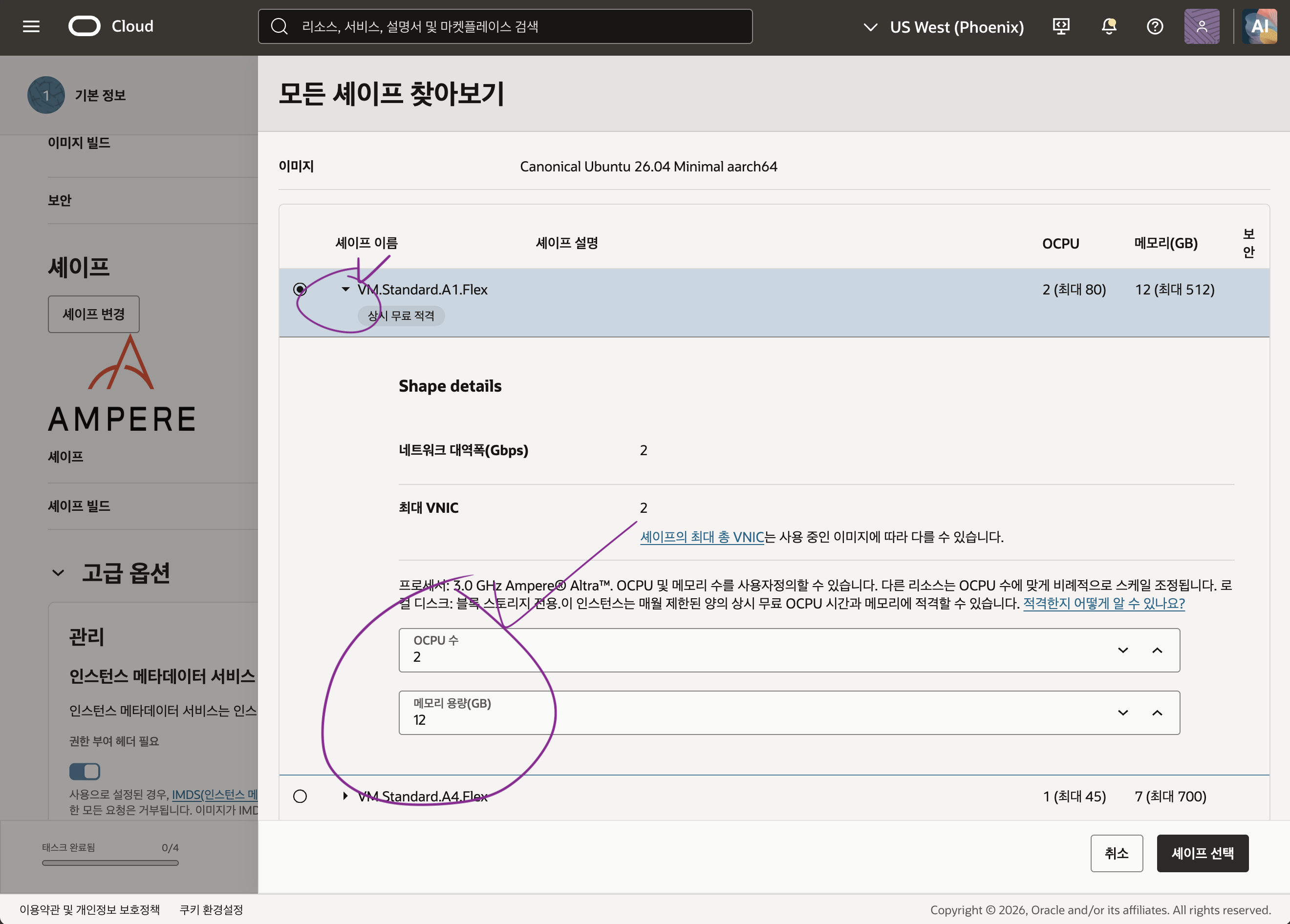
The previous free limit for Ampere A1 Compute (ARM)—4 cores and 24 GB of RAM—was recently adjusted to up to 2 OCPUs / 12 GB of RAM (with 200 GB total boot volume).
To avoid additional charges, keep the configuration at or below 2 cores / 12 GB RAM / 200 GB volume so you can safely use it for free indefinitely.
💡 Tip: What if you see “Out of host capacity”?
Oracle’s free ARM instances are popular, so you may see a “host capacity is unavailable” message and be unable to create one.
Solution: Upgrade your Oracle account to PAYG (Pay As You Go, a paid account with a registered payment card) to get priority allocation and create the instance immediately!
💳 Even after upgrading to a paid account, as long as you stay within the Always Free limits (2 cores / 12 GB RAM / 200 GB volume) described above, you will never be charged and will remain at $0 (free), so you can register your card without worry.
1-1. Select the instance, OS, and free configuration
Sign in to the Oracle Cloud console. From the top navigation, choose [Compute] > [Instances] > [Create instance].
- Operating system (Image): Select the lightweight, package-compatible Ubuntu 26.xx Minimal (aarch64 / ARM64) image.
- Compute configuration (Shape): Select
Ampere (VM.Standard.A1.Flex)and move the sliders to 2 OCPUs / 12 GB RAM, within the free limit. - Boot volume: Make sure it stays within the default 200 GB.
1-2. Create an SSH key pair and download the private key (required!)
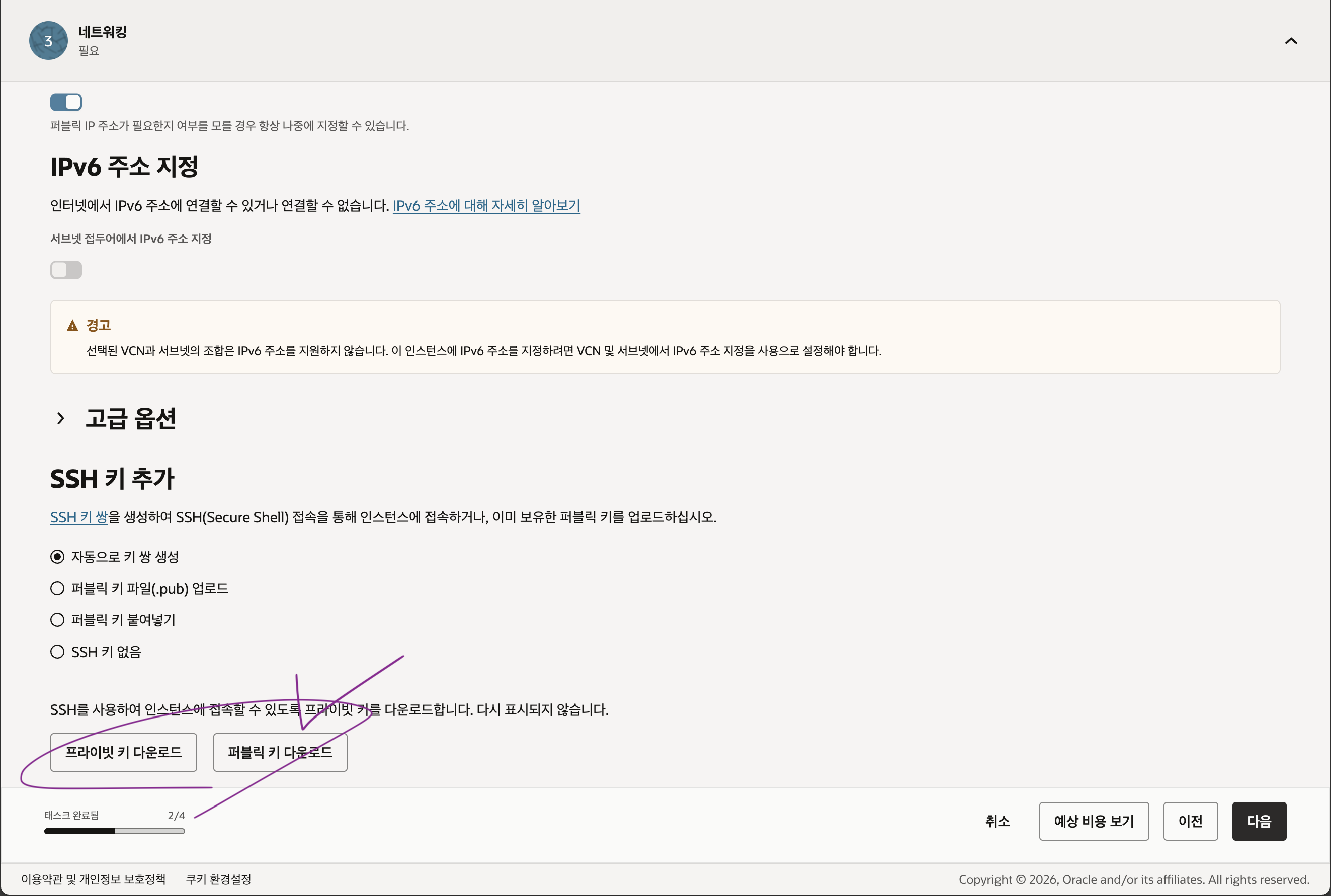
An SSH key is required to connect to the server securely without a password.
In the [SSH keys] section, choose [Generate a key pair for me], then click [Save private key] to download the private key (.key file) to a safe location on your local PC. You cannot download this key again if you lose it, so store it carefully.
1-3. Finish creating the instance and find its public IP
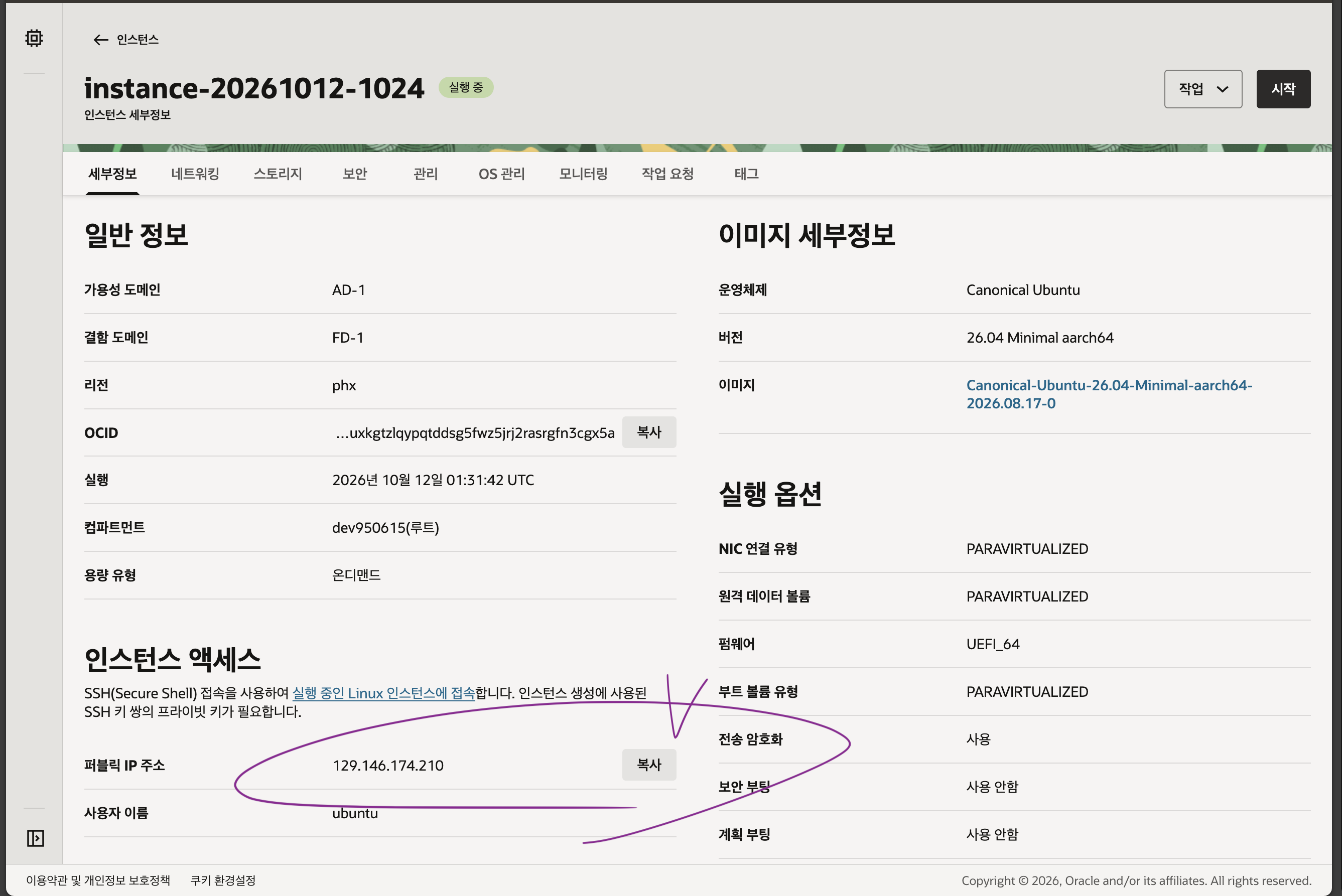
Click [Create] at the bottom of the page to start provisioning. After a minute or two, the orange icon should turn green and show Running.
Copy the public IP address from the instance details page; you’ll use it to connect to the server.
2. Use Antigravity to connect over SSH and prepare the environment
Normally, you would spend time running chmod 400 and ssh -i ... in a local terminal, keeping the connection alive, and updating packages. With Antigravity, an AI agent, you can do it with one prompt.
2-1. Configure SSH access and permissions in one step
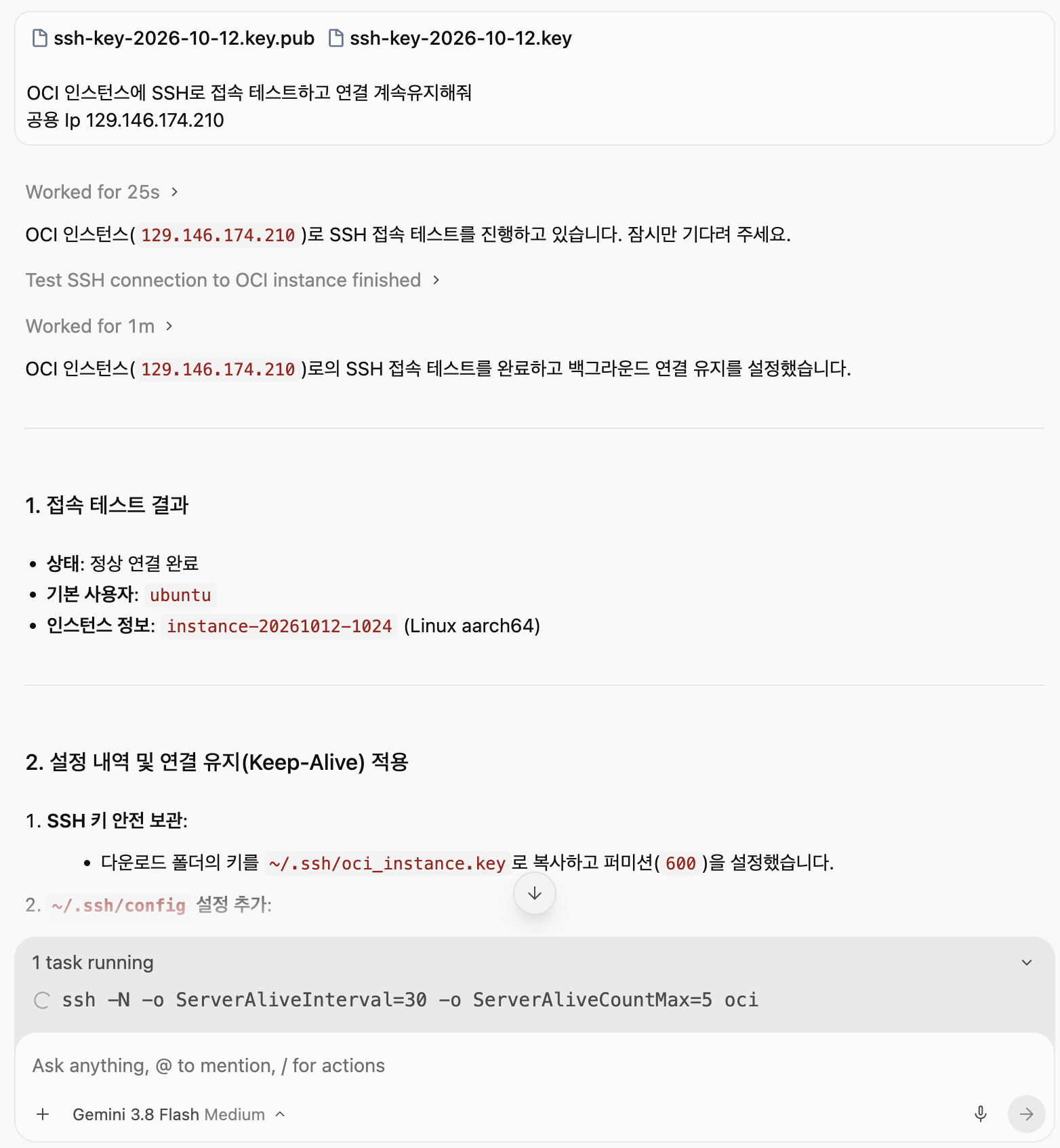
Open Antigravity and enter the prompt below with the path to the key you just downloaded. (Replace the IP address with your Oracle instance’s public IP.)
Test the SSH connection to my OCI instance and keep the connection alive.
Update the packages too.
Public IP 129.146.174.210
Antigravity will set the SSH private-key permissions, open a session, test the connection, keep it alive, and update the remote server’s packages.
3. Set up the Hermes Agent in one go
With the server ready, it’s time to install NousResearch Hermes Agent, your personal AI assistant that can run 24/7.
Enter the following prompt in Antigravity to install safely and verify the installation against the official documentation.
💬 Copy this prompt into Antigravity
Please install and help me set up NousResearch Hermes Agent.
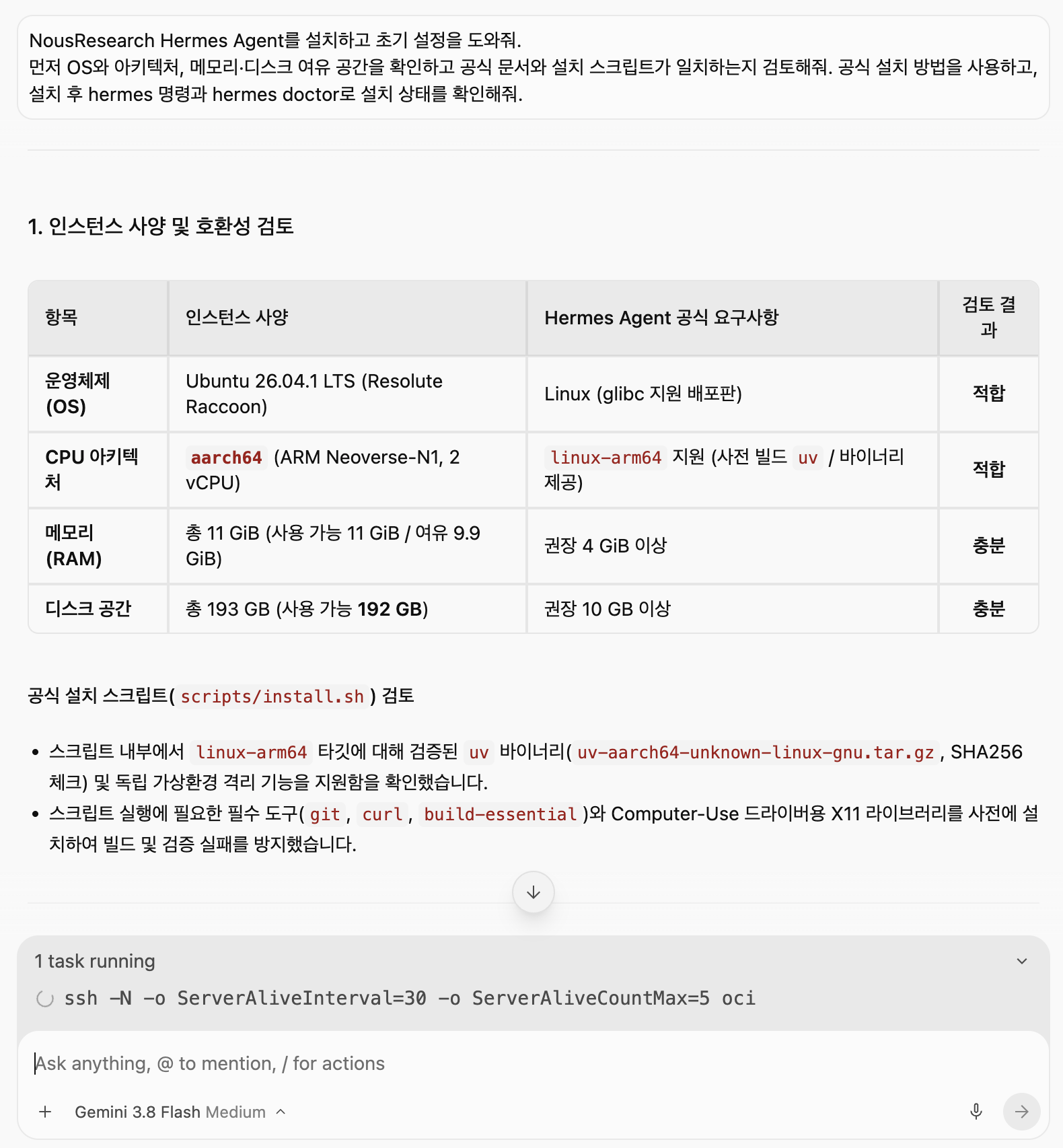
First check the OS and architecture, available memory, and disk space, and verify that the official documentation matches the install script. Use the official installation method, then check the installation with the hermes command and hermes doctor.
Antigravity will check the ARM64 (aarch64) architecture and available resources, install Hermes Agent according to the official guide, and run the hermes doctor health check.
4. Connect Telegram and run the bot in the background 24/7
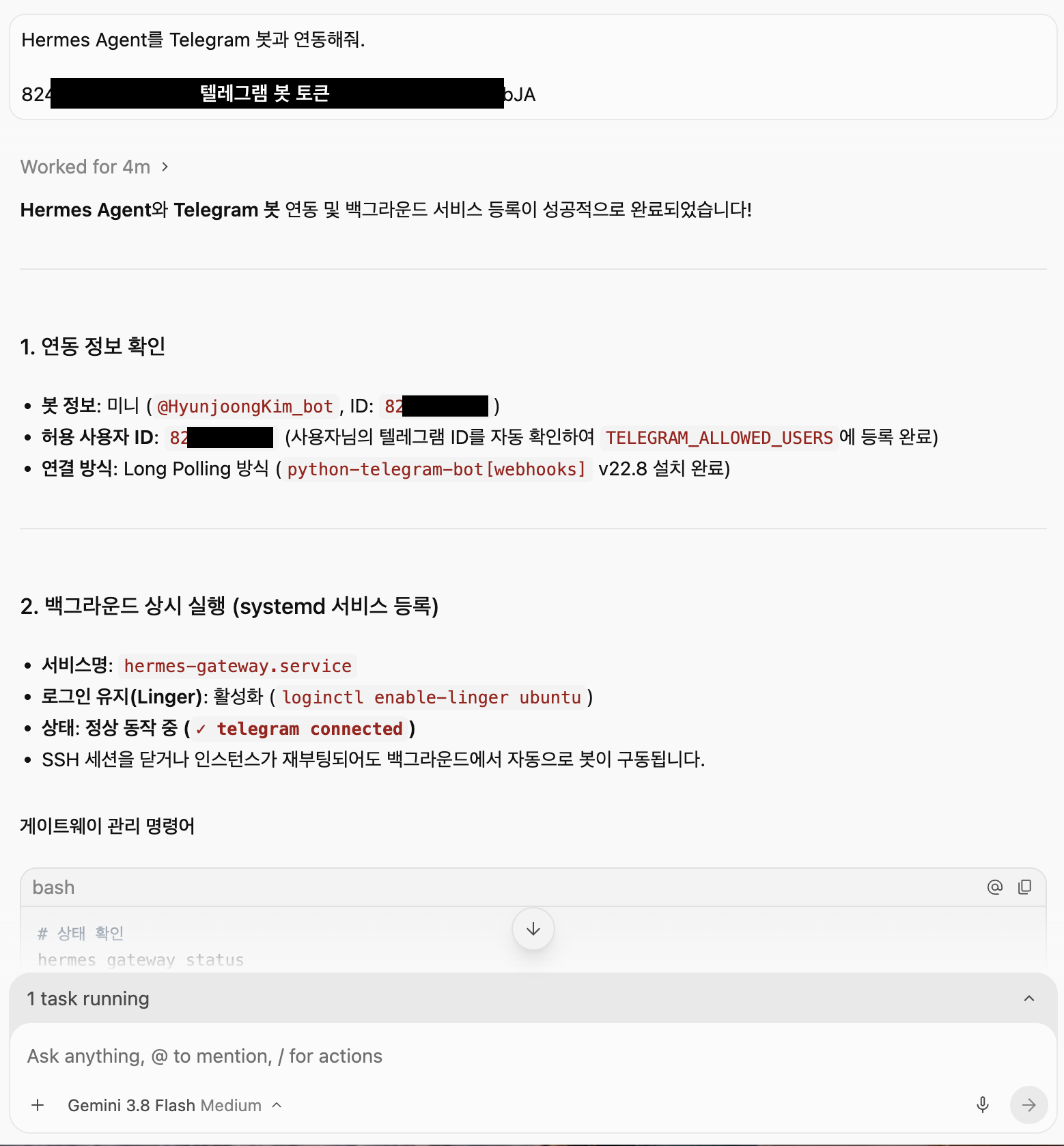
Connect the bot so you can chat with Hermes Agent and give it tasks anytime from Telegram on your phone.
- Get a Telegram bot token: Search for
@BotFatherin Telegram, send/newbotto create a bot, and get an HTTP API Token. - Add the configuration: Put the Telegram bot token and an LLM API key (OpenAI, Anthropic, Gemini, and so on) in Hermes’s
.envfile. - Run continuously in the background: Ask Antigravity to register Hermes as a background service so it stays up after you close the terminal.
“Register Hermes Agent as a systemd service so it keeps running in the background. Configure it to start automatically after a server reboot.”
When setup is complete, find your bot in Telegram and send it a message.
💡 Final thoughts
- Follow the latest Oracle free policy: 2 cores, 12 GB RAM, a 200 GB volume, and Ubuntu 26 Minimal (aarch64) for $0
- Solve capacity shortages completely: Switch to PAYG (register a card) to create an instance immediately without allocation failures (no charges within the free limits)
- Use the AI agent (Antigravity): Automate SSH Keep-Alive and
hermes doctorverification with one click - Build a personal AI assistant that runs 24/7: Chat and send tasks anytime through Telegram
Your personal AI server is ready with a solid 12 GB of RAM and no server cost! If you get stuck or have questions during setup, leave a comment anytime. 😊
🏷️ Suggested SEO tags
#OracleCloud #OracleFreeServer #AlwaysFree #OracleSpecs #OracleCapacity #PAYG #Ubuntu26 #aarch64 #Antigravity #NousResearch #HermesAgent #hermesdoctor #TelegramBot #PersonalAIServer