Specify · AI Documentation · 2026
Specify — Keeping Documentation in Step with Code
Built to reduce the searching and updating that follows a code change.
Visit Service
Project Overview
Specify grew from my experience spending about four hours aligning documents after a feature change during medical-device software certification preparation. It connects GitHub changes with the relevant developer documents and prepares updates.
Half a day of document work after one feature change
At a medical-device software startup, I worked on both development and certification preparation. For more than six months, I helped structure, write, and maintain documentation against development standards.
The hardest part was not starting a document. It was keeping several documents aligned with code that kept changing.
After a feature changed, I had to find the relevant documents, identify the affected passages, and check whether the same explanation appeared elsewhere. When someone else had written a document, finding it could be a task in itself.
For one feature change, this work took about four hours. Finishing the code meant starting a separate round of documentation work.
The same search happened after every change
A carefully written document still needed checking after the next update. Maintenance depended on the person who knew where it lived and why it had been written. When that person changed, the search started again.
Developers in other small teams described similar pressure in conversations: little time to write documentation, updates only when something was urgently needed, or development continuing without enough documentation.
The problem I wanted to address became concrete: find the related documents, locate the passages that need changing, and bring them back into line with the code.
Making code changes the starting point
I built Specify from that experience. It connects GitHub changes with a team's developer documents to reduce the maintenance work that follows a code update.
The workflow has four steps.
- Connect the sources. Bring together a GitHub repository, existing documents, and product information.
- Read the change. Analyze what changed when code is pushed.
- Find the affected documents. Locate relevant passages and prepare updates in their existing context.
- Review and apply. Inspect the evidence and proposed changes. Automatic application follows the project's settings.
Existing material is retrieved through RAG to provide context for drafting and updating documents. API references, internal wikis, onboarding guides, and release notes can all be affected by the same code change.
One change makes the problem easier to see
Suppose a webhook policy changes from three retries to five. The code may be complete, but if the integration guide still says “three retries,” the next developer will work from the old policy.
Someone needs to find that explanation, compare it with the updated code, and correct it. I am building Specify to continue that work from the code change itself.
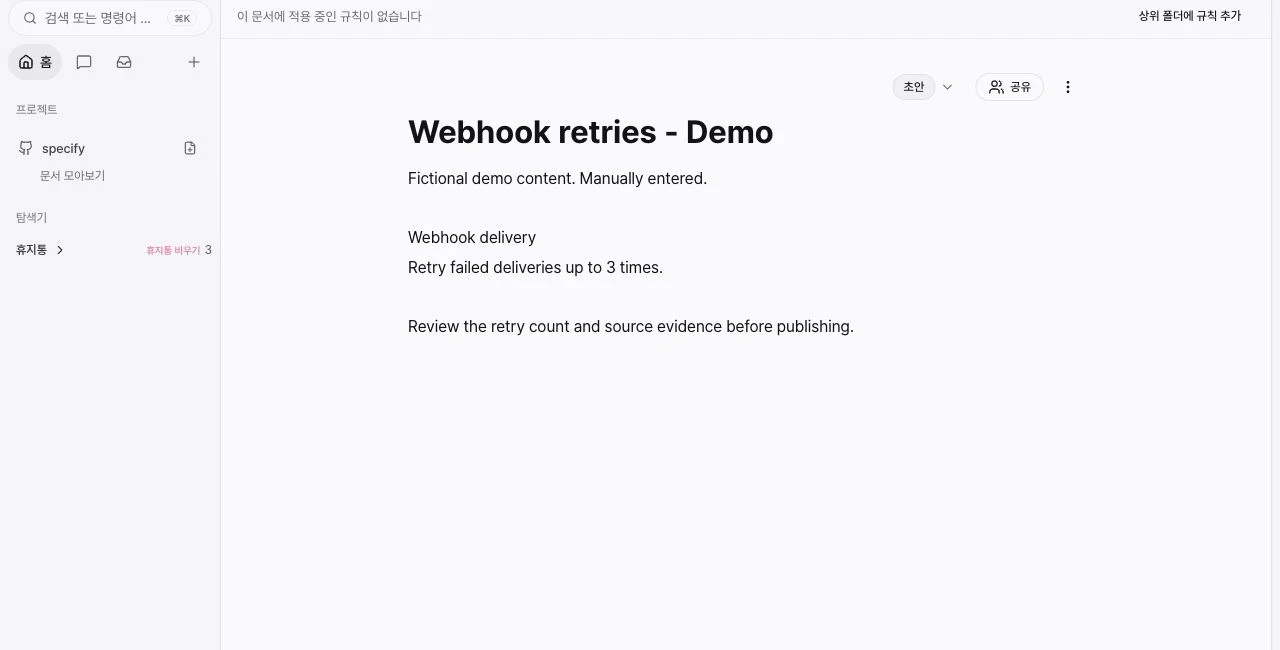
The screenshot below shows a manually written retry-policy demo document in the live editor. It illustrates editing, document status, and sharing controls; it is not a screenshot of an automatically applied update.
Documentation changes alongside code, both during certification preparation and throughout product maintenance. I want the searching and comparison I experienced to become work a team does not have to restart after every update.
Related engineering notes
Post-RAG Architecture: Practical Design for GraphRAG, Hybrid Retrieval, and Evaluation
Why vector-only RAG breaks in production, when GraphRAG is worth the complexity, and how to run a reliable evaluation loop across retrieval, generation, latency, and cost.
AI Agent Orchestration Is the Real Bottleneck: Design These Layers First
Agent systems usually fail in orchestration before they fail in model quality. This post breaks down workflow design, tool permissions, fallback, and evaluation as architecture problems.